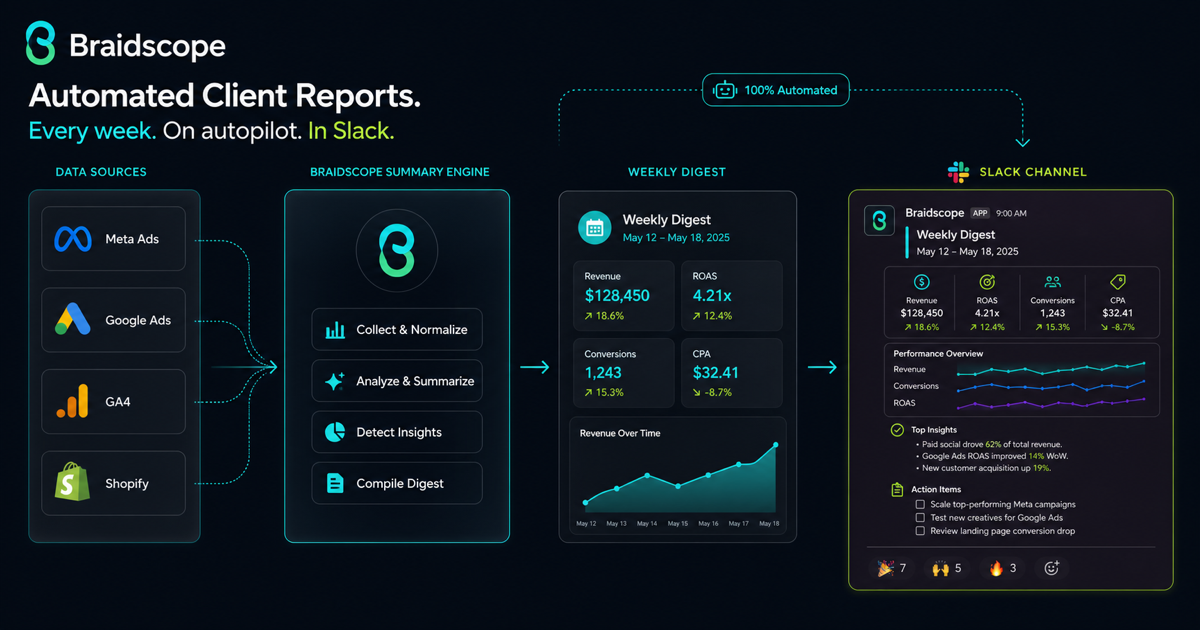
Clients often respond faster in Slack than email.
That makes Slack a useful place for lightweight reporting. Not full dashboards. Not 20 charts. Just a short weekly digest that tells the client what happened and what matters.
The goal is simple: keep clients informed without making them log into another tool.
Quick takeaways
- Slack reports work best as short weekly pulses, not full dashboards pasted into a channel.
- A useful Slack digest says what changed, why it matters, and what happens next.
- Automation should make the update consistent while still sounding like a person is paying attention.
Who Slack reporting is really for
Slack reporting is not only for agencies.
For an agency owner, it keeps every client relationship warm without asking account managers to write the same update from scratch every week.
For a founder running his own social media and paid campaigns, it creates a simple weekly habit. You get a short message that says what moved, what broke, and what needs attention.
For a business leader, Slack reporting gives visibility without forcing you into ad platforms, GA4, or Shopify dashboards. You can stay close to performance without becoming the analyst.
Why Slack reporting works
Slack-based reporting is async, visible, and easy to discuss.
The client can read the update on mobile, react, ask a question, or forward it internally. The agency can keep a clean record of weekly communication.
It also reduces the “any update?” messages because the update arrives automatically.
What a Slack report digest looks like
A good Slack digest is short.
Use this structure:
- Main KPI
- What changed
- Why it changed
- One next action
- Link to full dashboard
Example:
“Weekly update: revenue increased 12% while spend dropped 3%. ROAS improved from 3.2x to 3.8x, mostly from stronger retargeting performance. Next week we are shifting more budget into the winning creative set. Full dashboard: [link]”
That is enough for a weekly pulse.
Setup option 1: Zapier plus Sheets
The simplest no-code setup is:
- pull data into Google Sheets
- summarize the key metric manually or with formulas
- use Zapier to send a scheduled Slack message
This works for small agencies. It starts breaking when you need many clients, many sources, and reliable summaries.
Setup option 2: n8n workflow
n8n gives more control.
You can connect APIs, transform data, format messages, and send Slack updates on a schedule.
This is powerful if your team is technical. It is too much if your account managers need to manage reporting without a developer.
Setup option 3: Braidscope delivery
Braidscope is built to include automated Slack and email reporting.
The workflow is simpler: create a client workspace, connect data sources, let dashboards update, and deliver reports to the client channel.
This is a better fit for agencies that want reporting automation without building custom workflows for every client.
For the broader system, read how to automate client reporting.
What to include in the Slack digest
Include:
- one headline metric
- one short explanation
- one risk or win
- one next action
- dashboard link
Do not include:
- full tables
- every campaign
- every platform metric
- long paragraphs
- unexplained charts
Slack is for the pulse. The dashboard is for detail.
Make it sound human
The fastest way to make an automated Slack report feel robotic is to send only numbers.
Bad:
“Spend: $4,200. Revenue: $16,900. ROAS: 4.02.”
Better:
“Strong week. Revenue hit $16,900 on $4,200 spend, with ROAS holding above 4x. The lift came from retargeting, so next week we are watching whether prospecting can keep up.”
The second version still uses automation, but it feels like an operator is paying attention.
Set up the client channel
Create a dedicated client channel or use the client’s existing shared channel.
Set expectations during onboarding:
- when the digest sends
- who receives it
- what it includes
- where to ask follow-up questions
- where the full dashboard lives
This prevents the Slack report from becoming another noisy notification.
Common mistakes
The first mistake is sending too much data. Slack is not a report archive.
The second is sending numbers without interpretation.
The third is making every client’s Slack report custom. Standardize the format and customize the insight.
Bottom line
Slack reporting works when it is short, consistent, and tied to a dashboard.
If you want automated Slack and email reports without building workflows for every client, join the Braidscope closed beta and lock in founder pricing before launch.