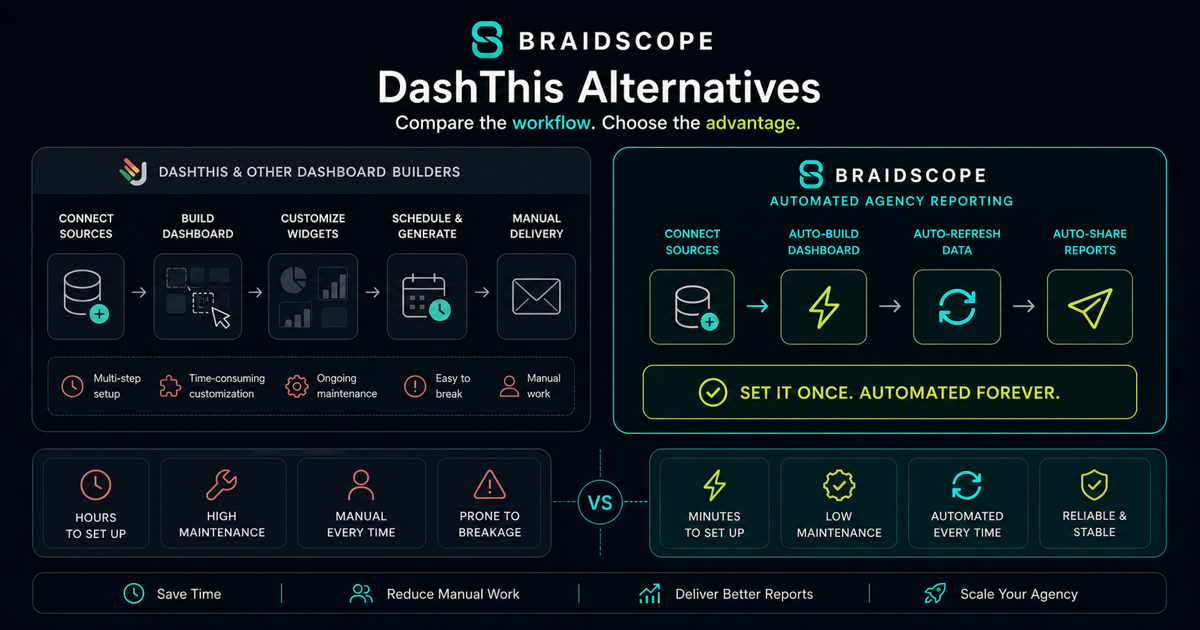
DashThis is a good reporting tool when your agency needs clean dashboards and simple scheduled reports. The problem shows up when you add more clients, need stronger automation, or want the report to explain what changed instead of only showing charts.
If you are comparing DashThis alternatives, the real question is not “which tool has prettier dashboards?” The better question is this: which tool removes the most reporting work from your team as your client count grows?
This guide compares six options agencies usually consider.
Quick takeaways
- DashThis is solid for clean dashboards, but growing agencies may need more automation and analysis.
- Compare tools by setup time, pricing model, AI support, and multi-client workflow.
- A better reporting setup should answer the client’s “so what?” question, not only show charts.
Quick read for different buyers
If you own a marketing agency, the main question is whether DashThis still fits once every new client needs another dashboard, another report, and another QA pass.
If you are a founder managing your own social media, ads, ecommerce, and analytics, you may not need a full agency reporting suite. You may need one clean place to understand what is happening without checking every platform.
If you are a business leader buying reporting from an agency, care less about the tool name and more about whether the report is clear, current, and easy to act on.
Why agencies look for DashThis alternatives
DashThis works best for straightforward dashboard delivery. You connect sources, build a dashboard, and send reports. That is useful.
Agencies start looking elsewhere for a few reasons.
First, dashboard-based pricing can become uncomfortable. If each client needs a separate dashboard, growth means more cost.
Second, setup still takes time. Templates help, but every new client still needs configuration, source checks, metric choices, and QA.
Third, there is no deep AI layer. Dashboards show data, but your strategist still has to explain the story.
Fourth, Slack delivery, client portals, and multi-client workflows are not always as native as agencies want.
If your team is spending Monday morning pulling numbers, checking dashboards, and writing summaries, the tool is only solving part of the job. Our multi-client dashboard guide breaks down why that workflow gets heavy after 5 to 10 clients.
DashThis alternatives compared
| Tool | Best fit | Pricing model | Multi-client support | AI answers | Automation |
|---|---|---|---|---|---|
| Braidscope | Agencies with 5+ clients | Flat-rate | Built in | Yes | Slack and email |
| AgencyAnalytics | Established agencies | Per client | Strong | Limited | Email reports |
| Whatagraph | Visual report delivery | Higher-tier plans | Good | Limited | Email reports |
| Looker Studio | Technical teams | Free plus connectors | Manual | No | Manual or add-ons |
| Databox | KPI dashboards | Tiered | Moderate | Limited | Alerts and reports |
| ReportGarden | Reporting plus proposals | Plan-based | Good | Limited | Reports and invoices |
1. Braidscope
Braidscope is built for agencies that do not want to rebuild the same reporting system for every client.
You create a workspace for each client, connect data sources like Meta Ads, Google Ads, GA4, Shopify, HubSpot, or Google Sheets, and dashboards appear automatically. There is no blank canvas and no long template setup.
The biggest difference is pricing. Braidscope uses flat-rate pricing:
- Freelancer: $39/month for 3 clients
- Agency: $99/month for 15 clients
- Agency Pro: $199/month for unlimited clients
That matters when you manage 15, 25, or 40 clients. Per-dashboard and per-client pricing can punish growth. Braidscope is designed to keep reporting cost predictable.
It also includes plain-English AI answers. Instead of opening a chart and trying to explain why performance changed, your team can ask questions like “What changed last week?” or “Why did ROAS drop?” That makes reporting faster and helps account managers respond to clients without waiting for an analyst.
Braidscope is still in closed beta for Q3 2026, so it is best for agencies willing to join early and shape the product. If that sounds like you, join the Braidscope closed beta.
2. AgencyAnalytics
AgencyAnalytics is one of the most established agency reporting tools. It has strong integration coverage, client dashboards, white-label options, and automated reports.
The tradeoff is pricing. It gets expensive as your client count grows because extra clients add cost. For agencies with stable client counts and mature reporting needs, it can be a good fit. For agencies scaling quickly, it is worth comparing against flat-rate options.
If AgencyAnalytics is your main comparison, read our full AgencyAnalytics alternatives guide or the Braidscope vs AgencyAnalytics comparison.
3. Whatagraph
Whatagraph is strong when presentation matters. Reports look polished, and the product is good for agencies that send client-facing summaries with a visual layer.
The downside is cost and operational weight. It can be more than a small agency needs, and it still does not remove the need to interpret the data.
Choose Whatagraph if visual report design is the primary problem. Choose something else if the bigger problem is dashboard setup, multi-client workflow, or analysis time.
How human does the reporting feel?
This is an underrated buying question.
Some reporting tools produce clean dashboards but still leave the client asking, “So what does this mean?”
The better setup gives the client a readable explanation. It should sound like a sharp account manager, not a software export.
4. Looker Studio
Looker Studio is the common budget option. It is free, flexible, and familiar to teams already living in the Google ecosystem.
But free does not mean cheap. Someone still has to build templates, connect data, troubleshoot broken sources, and duplicate dashboards for every client. Connector costs can also add up if you need paid tools like Supermetrics.
Looker Studio makes sense if you have a technical operator or analyst who enjoys maintaining the reporting system. It makes less sense if your account managers need something reliable without configuration.
5. Databox
Databox is excellent for KPI monitoring and internal dashboards. It is useful when an owner wants a quick view of business health.
For agency client reporting, it is less purpose-built. You can use it, but the workflow is not as focused on isolated client workspaces, white-label portals, or account manager delivery.
Databox is a good fit for teams that want scorecards and goals. It is not always the best fit for agencies that need repeatable client reporting at scale.
6. ReportGarden
ReportGarden combines reporting with proposals, budgets, and invoicing. That can be useful if your agency wants several client operations in one place.
The reporting feature set is practical, but it is not as modern as tools focused only on dashboards, AI summaries, and automated delivery. Choose it if you want operational breadth, not if your only goal is faster reporting.
How to choose based on agency size
If you manage 1 to 5 clients, DashThis or Looker Studio may be enough. You can tolerate manual setup because the client count is small.
If you manage 5 to 15 clients, pay attention to setup time. Every new client dashboard becomes an operations task. This is where a purpose-built reporting workflow starts to matter.
If you manage 15+ clients, flat pricing and automation become important. The tool should let you add clients without rebuilding dashboards and without increasing cost every time you grow.
Bottom line
DashThis is a solid reporting tool, but agencies with growing client rosters often need more than dashboards. They need predictable pricing, fast setup, AI interpretation, and automated delivery.
If your agency is tired of rebuilding reports for every client, join the Braidscope closed beta and lock in founder pricing before launch.