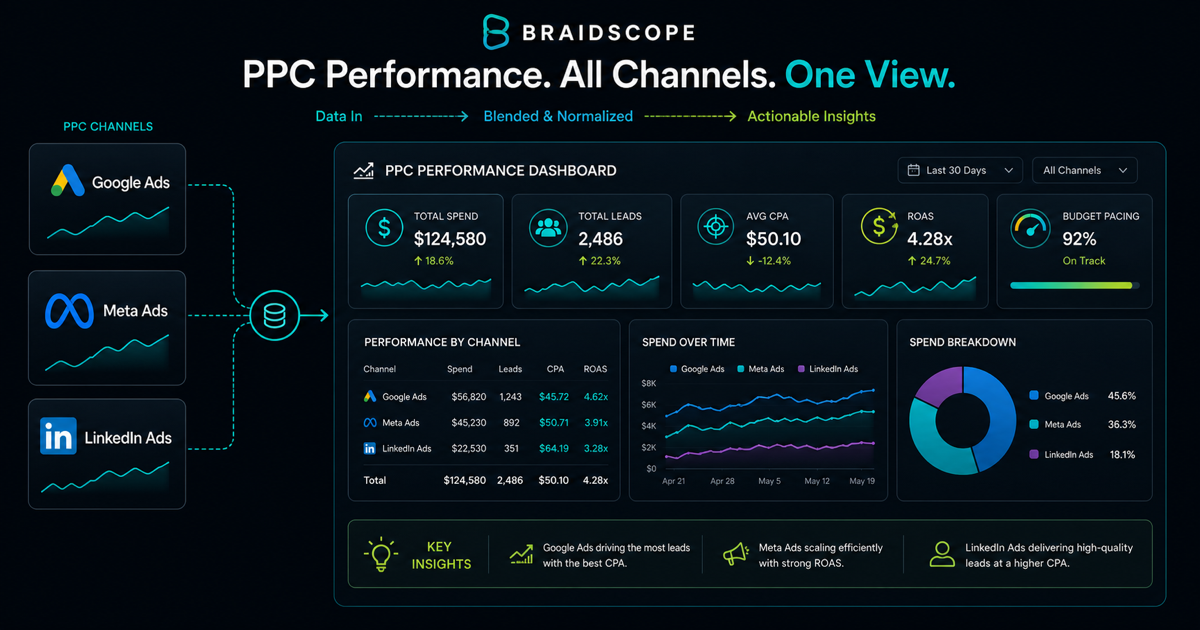
PPC reporting has one core job: prove whether the spend is working.
Clients may ask about clicks, impressions, and campaigns, but the real question is usually about money. Are we getting enough return for the budget?
A strong PPC report answers that fast, then explains the details.
Quick takeaways
- PPC reporting should feel financial first and technical second.
- Lead with blended spend, result, and return before breaking down channels.
- Bad months are easier to handle when the report explains cause and next action clearly.
The business-owner lens
PPC reports should feel financial, not technical.
A normal business owner does not wake up wanting to inspect impression share. He wants to know whether the budget produced leads, sales, or booked calls at a cost the business can handle.
That does not mean technical metrics are useless. It means they belong underneath the money story.
The PPC reporting challenge
PPC platforms produce too much data.
Google Ads, Meta Ads, LinkedIn Ads, and other platforms all use different metrics and attribution models. If you dump everything into one report, the client will not know what matters.
The report needs a hierarchy.
Start with business outcome. Then show spend. Then show channel detail.
The two numbers that matter most
For ecommerce, the two main numbers are ROAS and MER.
ROAS shows platform-attributed return. MER shows overall marketing efficiency across total revenue and total spend.
For lead generation, the two main numbers are cost per qualified lead and pipeline value.
Raw leads are not enough. A client can get more leads and still have worse economics if quality drops.
Supporting metrics
Include:
- spend
- impressions
- clicks
- CTR
- CPC
- conversion rate
- cost per conversion
- revenue or pipeline
- ROAS or cost per qualified lead
These metrics explain the main result. They should not replace it.
Report structure
Use this structure:
- Executive summary
- Spend and return
- Channel breakdown
- Campaign winners and losers
- What changed
- Budget recommendation
- Next tests
That structure works for both Google Ads and Meta Ads clients.
For paid media specific workflow ideas, see the paid media agency use case.
Handling a bad month
Bad months happen in PPC.
Creative fatigue, higher competition, seasonality, offer issues, landing page problems, and tracking changes can all hurt performance.
Do not hide behind platform noise. Explain the likely cause and the response.
Example:
“Cost per lead increased because conversion rate fell on the main landing page. CPC stayed stable. We are testing a shorter form and moving budget away from the lowest quality ad set.”
Clients can tolerate bad news. They struggle with unclear news.
When to show channel detail
Show channel detail after the blended view.
Start with total spend, total result, and blended cost or return. Then show Google, Meta, LinkedIn, or other channels.
This order keeps the client from overreacting to one platform when the total account is healthy.
Multi-channel PPC reporting
If a client runs Meta and Google together, do not report them as disconnected worlds.
Show:
- total spend
- total conversions or revenue
- blended ROAS or CPL
- channel contribution
- budget shift recommendation
This helps the client understand budget allocation instead of debating channels in isolation.
Automating PPC data collection
Manual PPC reporting is expensive because the data changes constantly.
Options include exports, Looker Studio, Supermetrics, custom API workflows, or Braidscope.
Braidscope is designed for agencies that want each client to have a ready dashboard without rebuilding the same reporting setup. It connects sources like Meta Ads, Google Ads, GA4, Shopify, HubSpot, and Google Sheets.
For the full process, read how to automate client reporting.
Bottom line
PPC reports should prove spend efficiency and guide budget decisions.
Lead with return, explain what changed, and recommend the next move.
If you want PPC dashboards and automated reports across all agency clients, join the Braidscope closed beta and lock in founder pricing before launch.