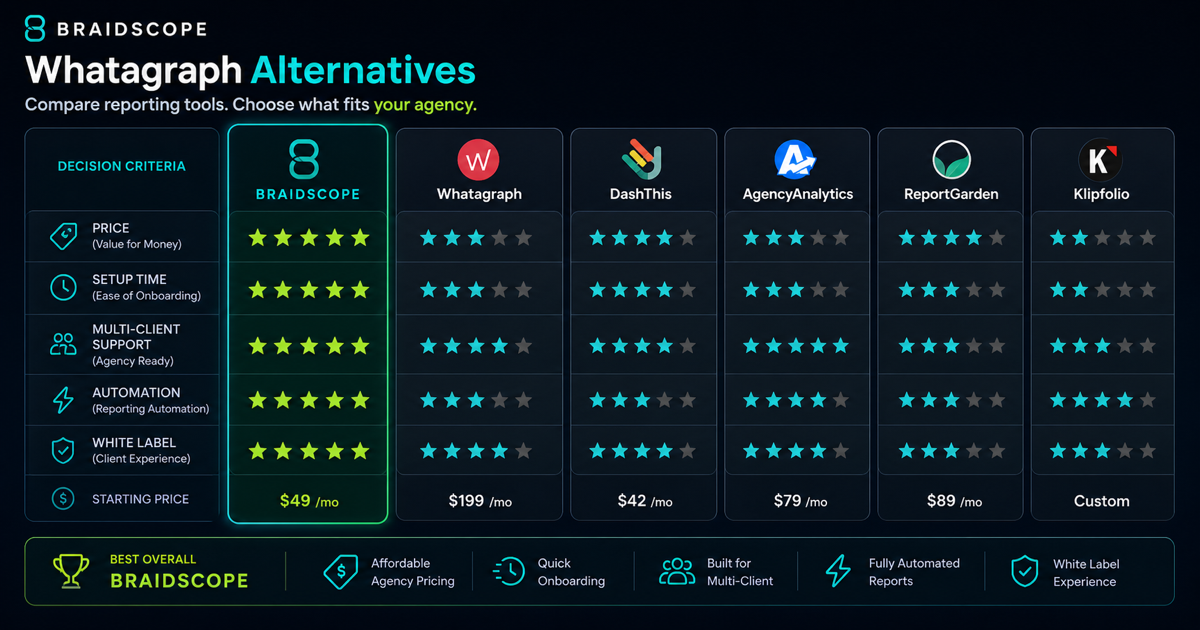
Whatagraph is strong at visual reporting. If your agency wants polished client reports, it is easy to understand why it gets shortlisted.
The issue is cost. Once you add more clients, users, data sources, and report needs, Whatagraph can become more expensive than the reporting problem it was supposed to solve.
This guide compares Whatagraph alternatives for agencies that want client reporting without heavy setup or painful pricing.
Quick takeaways
- Whatagraph is strong visually, but agencies should also compare cost, setup work, and analysis time.
- A beautiful report still fails if the client cannot understand the next decision.
- The right alternative depends on whether your pain is design, automation, pricing, or scale.
What the buyer is really trying to avoid
The buyer is usually not trying to avoid Whatagraph specifically.
They are trying to avoid a reporting setup that looks good but still takes too much work.
An agency owner wants fewer manual hours. A founder wants clearer visibility across platforms. A business leader wants one answer: are we growing efficiently?
The best reporting tool should make all three people feel less dependent on screenshots, exports, and status meetings.
Why Whatagraph gets expensive
Whatagraph is built around polished report delivery. That has value, especially for agencies that send monthly PDFs or presentation-style updates.
But agencies usually run into three problems.
The first is pricing. Plans can become expensive for growing teams, especially when more users, sources, and reporting needs are involved.
The second is interpretation. A beautiful report still needs a strategist to explain what happened, why it happened, and what the client should do next.
The third is scalability. Every new client still needs setup, review, and quality control. If your agency sells standardized reporting, you want the system to repeat itself with less manual work.
If your real goal is automation, start with our guide on how to automate client reporting.
What to look for in a Whatagraph alternative
A good alternative should do more than make reports look nice.
Look for:
- predictable pricing as clients increase
- fast setup for each client
- native multi-client workspaces
- automated email or Slack delivery
- white-label options
- plain-English explanations, not only charts
- integrations with your main client stack
For most agencies, the stack is Meta Ads, Google Ads, GA4, Shopify, HubSpot, and Google Sheets.
6 Whatagraph alternatives
| Tool | Best for | Pricing style | AI analysis | Setup effort |
|---|---|---|---|---|
| Braidscope | Multi-client agencies | Flat-rate | Yes | Low |
| AgencyAnalytics | Mature agency reporting | Per-client | Limited | Medium |
| DashThis | Simple dashboards | Per dashboard | No | Medium |
| Looker Studio | DIY reporting | Free plus connectors | No | High |
| Databox | KPI tracking | Tiered | Limited | Medium |
| Supermetrics | Data extraction | Per connector | No | High |
1. Braidscope
Braidscope is the best fit for agencies that want reporting to become a repeatable system, not a design project every time a new client signs.
The workflow is simple. Create a client workspace, connect the client’s sources, and Braidscope builds the dashboard automatically. That means no blank canvas, no dragging widgets around, and no per-client rebuild.
Braidscope also has AI answers. Your team can ask questions in plain English and get a written explanation of performance changes. That matters because most clients do not want a chart. They want the answer behind the chart.
Pricing is flat:
- $39/month for freelancers with 3 clients
- $99/month for agencies with 15 clients
- $199/month for unlimited clients
Braidscope is pre-launch and accepting agencies into closed beta. It is the right option if you want flat pricing, automated dashboards, and a product built specifically around multi-client reporting.
2. AgencyAnalytics
AgencyAnalytics is a serious Whatagraph alternative. It has client dashboards, reports, white-labeling, and a long list of integrations.
It is usually a better fit than Whatagraph for agencies that want an all-around reporting platform instead of primarily visual reports.
The tradeoff is per-client pricing. As your agency grows, the monthly bill grows too. That may be fine if each client has a high retainer. It is less attractive if you run lean reporting across many accounts.
Read the full AgencyAnalytics alternatives breakdown if this is your main comparison.
3. DashThis
DashThis is simpler than Whatagraph and often easier to operate. It is good for standard dashboards and scheduled reports.
It is not the best choice if you need AI interpretation or deeper client workspace automation. It also has dashboard-based pricing, so the cost still rises as your client count grows.
DashThis is a good option for agencies with predictable dashboard needs and a moderate client roster.
4. Looker Studio
Looker Studio is free and flexible. That is why agencies start there.
The hidden cost is labor. Someone has to connect every source, clean the data, fix broken connectors, duplicate dashboards, and keep client views organized. If you need non-Google sources, connector costs can also appear quickly.
Looker Studio is best when you have a technical team and do not mind maintaining your own reporting system.
5. Databox
Databox is strong for KPI dashboards, goals, and internal performance monitoring. It is easy to use and has a clean interface.
For client reporting, it can work, but agencies often need more client-specific workflow than Databox is designed for. It is better for tracking business metrics than replacing a complete agency reporting process.
6. Supermetrics
Supermetrics is not a full reporting tool. It is a data connector.
It helps you pull data from marketing platforms into Sheets, Looker Studio, Excel, or warehouses. For technical agencies, that is powerful.
For agencies trying to reduce manual reporting, it can become another system to maintain. Supermetrics solves data access, not report strategy, client delivery, or multi-client operations.
Which Whatagraph alternative should you choose?
Choose Braidscope if you have 5+ clients, want flat pricing, and want dashboards to appear automatically when you connect data.
Choose AgencyAnalytics if you want a mature reporting platform and are comfortable with per-client pricing.
Choose DashThis if you want simple dashboards with less complexity.
Choose Looker Studio if you have technical reporting skills in-house.
Choose Whatagraph if visual polish matters more than cost and automation.
The client perception test
Ask a non-technical client to open the report.
Can they tell what happened, why it happened, and what the next move is in two minutes?
If not, the report is not clear enough, even if it looks beautiful.
Bottom line
Whatagraph is good at making reports look polished. But if your agency’s real problem is time, cost, and scale, you need a reporting system that removes manual work.
For multi-client agencies that want flat pricing and less dashboard rebuilding, join the Braidscope closed beta and lock in founder pricing before launch.